

- Special Offers
- Transceiver Radio
- Transceiver Accessory
- Antennas
- Antenna Accessory
- Fiber Optics
- Cable
- Coax Antenna Cable
- Assembled Coax Cable
- Ethernet Cable
- HDMI Cable
- Spiral Telephone Cable
- Telephone Cable
- USB Cable
- Connector
- Installation Material
- Installation Tools
- Measuring Equipement
- Body Worn Camera
- Electrosmog
- Telephone
- Baby Monitor
- Fever Thermometer
- Radio Device
- Set-top Boxes
- Personal Protective Equipment
- Motorcycle Helmet Speaker
- Car Equipment
- Voltage Converter
- Dry Cell
- Battery
- Battery Charger
- Emergency Signal
- Amber Signal
- Sound Signal
- Light and Sound Signal Accessory
- Traffic Engineering
- LED Lamp
- Smart Home
- Mosquito Repellent Device
- Market - Other Products
- Discontinued Products
Pre-order (4)
Goobay (1)
Motorola (2)
ProCar (1)
USB Cable
When selecting a USB cable, the connector type, USB standard, data transfer function, charging current and cable length are the main parameters to check. Our range includes USB-A to USB-C, USB-C to USB-C and USB-A to USB-B cables for charging, data transfer or both functions. Read more...
Pre-order (4)
Goobay (1)
Motorola (2)
ProCar (1)
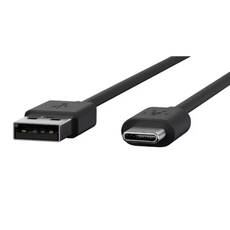
• Function: charging cable
• Connectors: USB-A and USB-C
• Length: 1 meter
• Color: black
• Dimensions: 3.4 mm x 14.9 mm x 1000 mm
• Adapter sold separately!


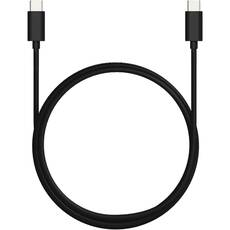
• Type: USB-C/USB-C data and charging cable
• Length: 2 meters
• Charging current: 3 A support, sufficient for charging most smart devices
• Data transfer: USB 2.0 (approx. 480 Mbps)
• Design: robust internal construction
• Compatibility: TurboPower fast charging
• Color: black
• PVC-free, BFR-free, phthalate-free, and RoHS-compliant
• 56 kOhm pull-up resistor
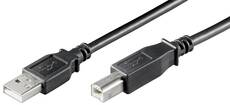
• USB-A to USB-B connector
• USB 2.0 standard
• Data transfer speeds of up to 480 Mbit/s
• Double shielding for stable signal transmission
• Plug & Play functionality
• Backward compatible with USB 1.1
• Durable PVC cable jacket
• Color: black
• Cable length: 5 m
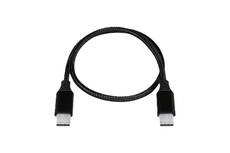
• Connector type: USB-C / USB-C
• Cable length: 1 m
• Maximum current: 3 A
• Data transfer: USB 2.0
• Color: black
• Sheath: braided fabric
• Manufacturer's part number: 52009000
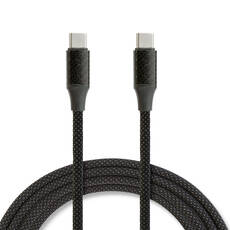
• Connector type: USB-C / USB-C
• Cable length: 1 m
• Maximum current: 3A / 60W
• Data transfer: USB 2.0
• Color: black
• Sheath: braided fabric, magnetic
USB cable for data transfer and charging
USB-A, USB-B and USB-C connectors
The USB-C to USB-C cables include versions that support USB 2.0 data transfer and 3 A current. The Motorola PMKN4294A is a 1 m USB-A to USB-C charging cable and requires a separate adapter. The Goobay USB-A to USB-B data cable is 5 m long and complies with the USB 2.0 standard.
Which USB connector cable should you choose?
Micro USB, Mini USB or USB-C?
When choosing the appropriate cable, check the connector on your device and the documented function of the cable. The current product range includes USB-A, USB-B and USB-C connections. The cable with a USB-B connector can be used with printers, scanners and other peripherals equipped with a USB-B port.
USB 2.0 data cable and technical characteristics
USB 3.0 or USB 2.0 data transfer?
For USB 2.0 cables, the documented data transfer rate can reach up to 480 Mbit/s. The Goobay USB-A to USB-B cable features double shielding, a copper inner conductor, nickel-plated contacts, a PVC jacket and AWG 28 + 24 wiring. Its nominal voltage is 5 V, and it is backward compatible with USB 1.1.
What should you check when choosing a charging cable?
USB-C charging cable and 3 A current
The 2 m Motorola USB-C to USB-C cable supports 3 A charging current, USB 2.0 data transfer and TurboPower fast charging compatibility. It is PVC-free, BFR-free and phthalate-free, RoHS compliant, and includes a 56 kOhm pull-up resistor. The 1 m ProCar USB-C to USB-C cable supports USB 2.0 data transfer and a maximum current of 3 A and has a textile-braided jacket.
Which documented pros and cons should be considered?
- Pro: some USB-C cables can be used for both charging and data transfer.
- Pro: the Goobay USB-A to USB-B cable supports Plug & Play operation and features double shielding.
- Con: the Motorola PMKN4294A cable requires a separate adapter.
Frequently asked questions about USB cables
- What data transfer rate does USB 2.0 support?
For the USB 2.0 cables in this category, a maximum data transfer rate of 480 Mbit/s is documented. - Is there a USB-C cable suitable for both charging and data transfer?
Yes. The 2 m Motorola USB-C to USB-C cable and the 1 m ProCar USB-C to USB-C cable support both functions. - Which cable lengths are available in the range?
The current products are available in 1 m, 2 m and 5 m lengths.
USB cable summary
When selecting a USB cable, we recommend that you first check the two connector types, followed by the data transfer standard, charging current and required cable length.