

Hytera Programming Software And Cable
The Hytera programming software and cable category includes connection solutions for computer-based programming of compatible radio communication equipment. The documented range includes programming cables for handheld radios, mobile radios, repeaters and selected wireless audio accessories. Different devices require different connectors, so the correct cable should always be selected according to the compatibility of the equipment being programmed. Read more...

• Programming cable for AP5/BP5 series
• USB type A to 9 pin connector
• Length: 1.2 m
• For AP515 LF, AP525 LF, BP515 LF, AP515, AP585, BP515, BP565 portable radios


• Programming cable for SM27W1 wireless loudspeaker microphone


• 10pin connector - USB male
• Length: 1.2 m
• For MD655, MD785, MD785G, MD785i, HM655, HM685, HM785, RD965, RD985, RD985, RD985S, HR655, HR1065 radios

• DB26 plug - USB plug
• For mobile radios and repeaters
• For MD655, MD785, MD785G, MD785i, RD625, RD985, RD985S, HM785, HR1065 radios

• Programming cable with USB rocker switch
• 10-pin air transport connector - USB plug
• Cable length: 1,2m
• For MD655, MD785, MD785G, MD785i, HM655, HM686, HM785, RD965, RD985, RD985S, HR655, HR1065 radios

• 13pin connector - USB male
• Length: 1.2 m
• For HP505, HP565, HP605, HP685, HP705, HP785, HP795ExA, HP795ExC, PTC680, PDC680, PT590 radios

• Programming cable for handheld radios in PD7 series and PD985

• Cable with 10-pin flying connector
• For CPS programming and firmware updates
• Length: 1.2 m
• For MD615 and MD625 devices

• USB programming cable PD3 for radio series
• Connector: USB-Micro-USB
• Length: 1.5 m
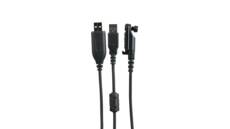
• 13-pin connector to USB and UART interfaces
• Cable length: 1 m
• Connector type: 13-pin to USB and UART
• Compatible devices: PDC680 and PTC680 radios
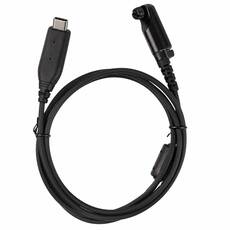
• 13pin connector - USB-C male
• Compatibility: W60, HP715,HP875 and PT590 radios
Hytera programming software and cable for radio configuration
A Hytera programming cable provides the physical connection between compatible radio communication equipment and the computer used for programming. The category includes several connector configurations because handheld radios, mobile radios, repeaters and other supported devices do not always use the same programming interface. For some documented versions, the supported applications include programming with CPS software and firmware updates.
How is a Hytera programming cable used for radio programming?
The programming cable is used to establish a connection between the radio's programming interface and the computer. The documented range includes USB-based designs as well as versions with multi-pin radio-side connectors. When selecting a cable, checking only the USB connector on the computer side is not sufficient because the radio-side interface depends on the device type.
USB programming cable for handheld and mobile radios
The category includes programming cables using USB-A and Micro-USB connections. Documented radio-side connectors include 9-pin, 10-pin and 13-pin designs as well as DB26 connectors. These connectors are associated with different radios and system components, so matching the connector type alone does not confirm compatibility.
Which connectors can be used for Hytera radio configuration?
The connector design of documented programming cables is matched to the programming interface of the corresponding radio or system component. The range includes USB-A, Micro-USB, DB26 and several multi-pin connector configurations. Because of these differences, the cables should not be considered universally interchangeable.
CPS software and firmware updates with a programming cable
For some documented cable designs, CPS programming and firmware updates are supported. This function cannot automatically be generalised to every programming cable, so compatibility with the selected radio and the supported programming tasks should be checked separately.
- Programming cables for handheld radios.
- Cables for computer-based programming of mobile radios.
- Programming connections for repeaters.
- Documented USB-A and Micro-USB interfaces.
- 9-pin, 10-pin and 13-pin radio-side connectors.
- Programming cable configurations with DB26 connectors.
Physical connector compatibility and actual radio compatibility are separate considerations. We recommend checking the exact equipment type and the documented programming cable before making a selection.
How should you select a programming cable for a handheld radio, mobile radio or repeater?
The type of equipment to be programmed is the primary selection criterion. The radio-side connector, computer-side connection and documented programming function can then be checked. Cable length and connector configuration may vary between versions, so these properties cannot be generalised across the entire category.
Summary: Hytera radio programming and programming cables
The Hytera programming software and cable category includes connection solutions for computer-based programming of several types of radio communication equipment. Because USB, multi-pin and DB26 interfaces are used, compatibility checking is essential. CPS programming and firmware updates are also documented for selected cable configurations.
What are the most common questions about Hytera programming cables?
- Can every Hytera programming cable be used with every radio?
No. Compatibility is linked to specific radios and system components. - Which connector types are available?
USB-A, Micro-USB, DB26, and 9-pin, 10-pin and 13-pin connections are documented. - Can a programming cable be used for firmware updates?
Firmware updates are supported by selected documented cable configurations. - How should I select the correct programming cable?
Selection should be based on the documented compatibility and connector type of the radio or system component being programmed.